Skip to content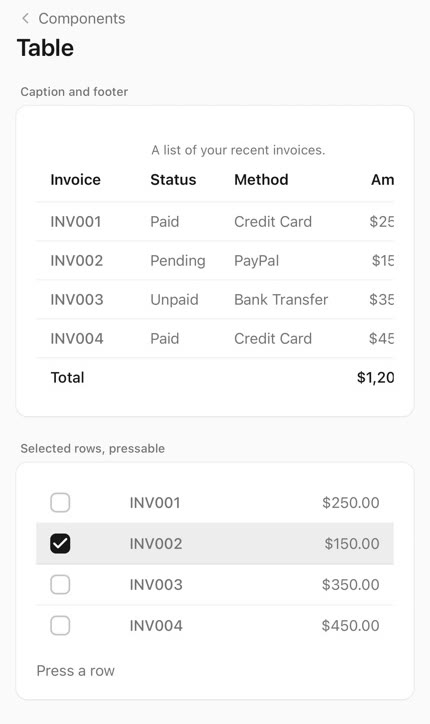
table-example.tsx
A responsive table component.
Installation
Usage
import { Checkbox } from "@/components/ui/checkbox"
import {
Table,
TableBody,
TableCaption,
TableCell,
TableFooter,
TableHead,
TableHeader,
TableRow,
} from "@/components/ui/table"
import { Text } from "@/components/ui/text"<Table>
<TableCaption>A list of your recent invoices.</TableCaption>
<TableHeader>
<TableRow>
<TableHead className="w-[100px]">Invoice</TableHead>
<TableHead>Status</TableHead>
<TableHead className="text-right">Amount</TableHead>
</TableRow>
</TableHeader>
<TableBody>
{INVOICES.map((invoice) => (
<TableRow key={invoice.id}>
<TableCell className="font-medium">{invoice.id}</TableCell>
<TableCell>{invoice.status}</TableCell>
<TableCell className="text-right">{invoice.total}</TableCell>
</TableRow>
))}
</TableBody>
<TableFooter>
<TableRow>
<TableCell colSpan={2}>Total</TableCell>
<TableCell className="text-right">$1,200.00</TableCell>
</TableRow>
</TableFooter>
</Table>Composition
TableTableBodyTableCaptionTableCellTableFooterTableHeadTableHeaderTableRow
Examples
import * as React from "react"
import { Checkbox } from "@/components/ui/checkbox"
import {
Table,
TableBody,
TableCaption,
TableCell,
TableFooter,
TableHead,
TableHeader,
TableRow,
} from "@/components/ui/table"
import { Text } from "@/components/ui/text"
const INVOICES = [
{ id: "INV001", status: "Paid", total: "$250.00", method: "Credit Card" },
{ id: "INV002", status: "Pending", total: "$150.00", method: "PayPal" },
{ id: "INV003", status: "Unpaid", total: "$350.00", method: "Bank Transfer" },
{ id: "INV004", status: "Paid", total: "$450.00", method: "Credit Card" },
]
const WIDE = Array.from({ length: 8 }, (_, index) => `Column ${index + 1}`)
function TableExample() {
const [selected, setSelected] = React.useState("INV002")
const [lastPressed, setLastPressed] = React.useState("Press a row")
return (
<ExampleWrapper>
<Example title="Caption and footer" className="items-stretch">
<Table>
<TableCaption>A list of your recent invoices.</TableCaption>
<TableHeader>
<TableRow>
<TableHead className="w-[100px]">Invoice</TableHead>
<TableHead>Status</TableHead>
<TableHead className="text-right">Amount</TableHead>
</TableRow>
</TableHeader>
<TableBody>
{INVOICES.map((invoice) => (
<TableRow key={invoice.id}>
<TableCell className="font-medium">{invoice.id}</TableCell>
<TableCell>{invoice.status}</TableCell>
<TableCell className="text-right">{invoice.total}</TableCell>
</TableRow>
))}
</TableBody>
<TableFooter>
<TableRow>
<TableCell colSpan={2}>Total</TableCell>
<TableCell className="text-right">$1,200.00</TableCell>
</TableRow>
</TableFooter>
</Table>
</Example>
<Example title="Selected rows, pressable" className="items-stretch">
<Table>
<TableBody>
{INVOICES.map((invoice) => (
<TableRow
key={invoice.id}
data-state={selected === invoice.id ? "selected" : undefined}
onPress={() => {
setSelected(invoice.id)
setLastPressed(invoice.id)
}}
>
<TableCell>
<Checkbox
accessibilityLabel={`Select ${invoice.id}`}
checked={selected === invoice.id}
onCheckedChange={() => setSelected(invoice.id)}
/>
</TableCell>
<TableCell className="font-medium">{invoice.id}</TableCell>
<TableCell className="text-right">{invoice.total}</TableCell>
</TableRow>
))}
</TableBody>
</Table>
<Text className="text-muted-foreground">{lastPressed}</Text>
</Example>
<Example
title="Wider than the screen, it scrolls"
className="items-stretch"
>
<Table>
<TableHeader>
<TableRow>
{WIDE.map((name) => (
<TableHead key={name}>{name}</TableHead>
))}
</TableRow>
</TableHeader>
<TableBody>
{INVOICES.map((invoice) => (
<TableRow key={invoice.id}>
{WIDE.map((name) => (
<TableCell key={name}>{invoice.method}</TableCell>
))}
</TableRow>
))}
</TableBody>
</Table>
</Example>
</ExampleWrapper>
)
}
export { TableExample }API reference
Props it adds to what it wraps: "aria-expanded", colSpan.
Differences from web
Same. Views in a horizontal scroll: React Native has no table layout, so rowSpan isn't supported.
Accessibility
Parts set role="cell", role="columnheader", role="row", role="rowgroup", role="table", read by VoiceOver and TalkBack. Give a control with no text an accessibilityLabel.