The frame an app lives in. A sidebar, a main column with a header, panels that dock or float, one shortcut registry, and the native window of desktop apps.
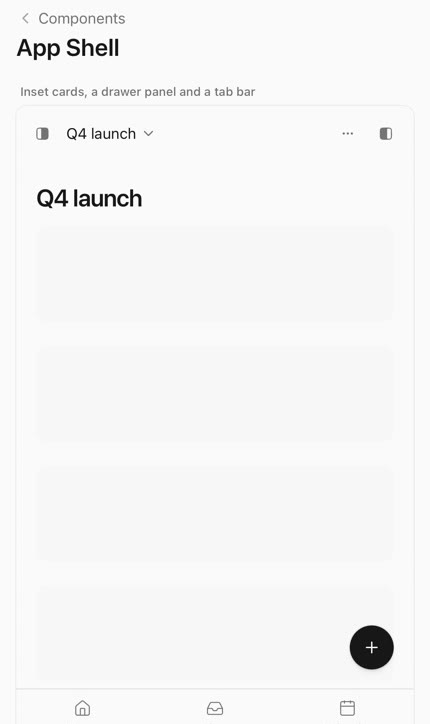
Installation
Usage
import {
AppNav,
AppNavBottomBar,
type AppNavGroup,
type AppNavItem,
} from "@/components/ui/app-nav"
import {
AppShell,
AppShellBreadcrumb,
AppShellContent,
AppShellHeader,
AppShellHeaderActions,
AppShellMain,
AppShellPageTitle,
AppShellPanel,
AppShellPanelClose,
AppShellPanelContent,
AppShellPanelHeader,
AppShellPanelTabs,
AppShellPanelTitle,
AppShellPanelTrigger,
AppShellPanelView,
AppShellStatusBar,
AppShellTitlebar,
} from "@/components/ui/app-shell"
import { Button } from "@/components/ui/button"
import {
Sidebar,
SidebarContent,
SidebarFooter,
SidebarHeader,
SidebarRail,
} from "@/components/ui/sidebar"
import { Text } from "@/components/ui/text"
import { UserMenu } from "@/components/ui/user-menu"
import { WorkspaceSwitcher } from "@/components/ui/workspace-switcher"<Frame>
<Shell hasTabBar />
</Frame>Composition
AppShellAppShellActionAppShellBottomNavAppShellBottomNavItemAppShellBreadcrumbAppShellBreadcrumbItemAppShellContentAppShellHeaderAppShellHeaderActionsAppShellMainAppShellPageTitleAppShellPanelAppShellPanelCloseAppShellPanelContentAppShellPanelHeaderAppShellPanelTabsAppShellPanelTitleAppShellPanelTriggerAppShellPanelViewAppShellPanelViewOptionAppShellStatusBarAppShellTitlebarAppShellWindowIconLikeIconSlotShellShortcut
Examples
import * as React from "react"
import {
ActivityIcon,
BellIcon,
BoxIcon,
CalendarIcon,
GitBranchIcon,
HomeIcon,
InboxIcon,
InfoIcon,
LifeBuoyIcon,
MessageSquareIcon,
PlusIcon,
SearchIcon,
ShareIcon,
UsersIcon,
} from "@fabricator-ui/icons-react-native"
import { View } from "react-native"
import { SafeAreaInsetsContext } from "react-native-safe-area-context"
import type {
AppShellContentSize,
PanelMobile,
} from "@/registry/fabricator/shared/lib/app-shell-model"
import {
AppNav,
AppNavBottomBar,
type AppNavGroup,
type AppNavItem,
} from "@/components/ui/app-nav"
import {
AppShell,
AppShellBreadcrumb,
AppShellContent,
AppShellHeader,
AppShellHeaderActions,
AppShellMain,
AppShellPageTitle,
AppShellPanel,
AppShellPanelClose,
AppShellPanelContent,
AppShellPanelHeader,
AppShellPanelTabs,
AppShellPanelTitle,
AppShellPanelTrigger,
AppShellPanelView,
AppShellStatusBar,
AppShellTitlebar,
} from "@/components/ui/app-shell"
import { Button } from "@/components/ui/button"
import {
Sidebar,
SidebarContent,
SidebarFooter,
SidebarHeader,
SidebarRail,
} from "@/components/ui/sidebar"
import { Text } from "@/components/ui/text"
import { UserMenu } from "@/components/ui/user-menu"
import { WorkspaceSwitcher } from "@/components/ui/workspace-switcher"
const NO_INSETS = { top: 0, right: 0, bottom: 0, left: 0 }
const WORKSPACES = [
{ id: "acme", name: "Acme Inc", description: "Enterprise" },
{ id: "studio", name: "Fabricator Studio", description: "Pro" },
]
const USER = { name: "Gabs Fabricator", email: "gabs@fabricator.dev" }
const GROUPS: AppNavGroup[] = [
{
id: "main",
items: [
{ id: "home", label: "Home", href: "/", icon: HomeIcon, mobile: "tab" },
{
id: "inbox",
label: "Inbox",
href: "/inbox",
icon: InboxIcon,
badge: 4,
mobile: "tab",
},
{
id: "calendar",
label: "Calendar",
href: "/calendar",
icon: CalendarIcon,
mobile: "tab",
},
],
},
{
id: "workspace",
label: "Workspace",
collapsible: true,
items: [
{
id: "projects",
label: "Projects",
href: "/projects",
icon: BoxIcon,
children: [
{ id: "launch", label: "Q4 launch", href: "/projects/launch" },
{ id: "website", label: "Website", href: "/projects/website" },
],
},
{ id: "team", label: "Team", href: "/team", icon: UsersIcon },
{ id: "help", label: "Help center", href: "/help", icon: LifeBuoyIcon },
],
},
]
const VIEWS = [
{ value: "details", label: "Details", icon: InfoIcon },
{ value: "activity", label: "Activity", icon: ActivityIcon },
{ value: "comments", label: "Comments", icon: MessageSquareIcon },
]
function Frame({ children }: { children: React.ReactNode }) {
return (
<SafeAreaInsetsContext value={NO_INSETS}>
<View className="h-[640px] w-full overflow-hidden rounded-xl">
{children}
</View>
</SafeAreaInsetsContext>
)
}
function Shell({
variant = "inset",
collapsible = "icon",
mobileSidebar = "reveal",
mobile = "drawer",
contentSize = "md",
hasStatusBar = false,
hasTabBar = false,
titlebar,
}: {
variant?: "sidebar" | "floating" | "inset"
collapsible?: "offcanvas" | "icon" | "none"
mobileSidebar?: "reveal" | "sheet"
mobile?: PanelMobile
contentSize?: AppShellContentSize
hasStatusBar?: boolean
hasTabBar?: boolean
titlebar?: React.ReactNode
}) {
const [pathname, setPathname] = React.useState("/projects/launch")
const [workspace, setWorkspace] = React.useState("acme")
const navigate = (item: AppNavItem) => {
if (item.href) setPathname(item.href)
}
return (
<AppShell
mobileSidebar={mobileSidebar}
minMainWidth={420}
titlebar={titlebar}
storage={null}
>
<Sidebar variant={variant} collapsible={collapsible}>
<SidebarHeader>
<WorkspaceSwitcher
workspaces={WORKSPACES}
activeId={workspace}
onSelect={setWorkspace}
onCreate={() => {}}
onManage={() => {}}
/>
</SidebarHeader>
<SidebarContent>
<AppNav groups={GROUPS} pathname={pathname} onNavigate={navigate} />
</SidebarContent>
<SidebarFooter>
<UserMenu user={USER} />
</SidebarFooter>
<SidebarRail />
</Sidebar>
<AppShellMain>
<AppShellHeader trigger="auto">
<AppShellBreadcrumb
maxItems={3}
items={[
{ label: "Acme Inc" },
{ label: "Workspace", onSelect: () => setPathname("/") },
{ label: "Projects", onSelect: () => setPathname("/projects") },
{ label: "Q4 launch" },
]}
/>
<AppShellHeaderActions
actions={[
{
id: "search",
label: "Search",
icon: SearchIcon,
onSelect: () => {},
},
{
id: "share",
label: "Share",
icon: ShareIcon,
onSelect: () => {},
},
{
id: "alerts",
label: "Alerts",
icon: BellIcon,
disabled: true,
onSelect: () => {},
},
]}
primaryAction={{
id: "new",
label: "New task",
icon: PlusIcon,
onSelect: () => {},
}}
/>
<AppShellPanelTrigger panel="details" />
</AppShellHeader>
<AppShellContent size={contentSize}>
<AppShellPageTitle>Q4 launch</AppShellPageTitle>
{Array.from({ length: 12 }, (_, index) => (
<View key={index} className="my-3 h-24 rounded-xl bg-muted/50" />
))}
</AppShellContent>
{hasTabBar ? (
<AppNavBottomBar
groups={GROUPS}
pathname={pathname}
onNavigate={navigate}
/>
) : null}
</AppShellMain>
<AppShellPanel
id="details"
label="Details"
side="right"
views={VIEWS}
defaultOpen
defaultView="details"
defaultWidth={320}
minWidth={240}
maxWidth={480}
mobile={mobile}
shortcut="mod+\"
>
<AppShellPanelHeader>
<AppShellPanelTabs />
<AppShellPanelClose />
</AppShellPanelHeader>
<AppShellPanelView value="details">
<Text className="p-4">The page's details.</Text>
</AppShellPanelView>
<AppShellPanelView value="activity">
<Text className="p-4">Nothing new today.</Text>
</AppShellPanelView>
<AppShellPanelView value="comments">
<Text className="p-4">No comments yet.</Text>
</AppShellPanelView>
</AppShellPanel>
<AppShellPanel id="outline" label="Outline" side="left" mobile="none">
<AppShellPanelHeader>
<AppShellPanelTitle>Outline</AppShellPanelTitle>
<AppShellPanelClose />
</AppShellPanelHeader>
<AppShellPanelContent>
<Text className="p-4">A panel without views.</Text>
</AppShellPanelContent>
</AppShellPanel>
{hasStatusBar ? (
<AppShellStatusBar>
<GitBranchIcon />
<Text>main</Text>
<Button variant="ghost" size="sm" className="ml-auto">
4 open
</Button>
</AppShellStatusBar>
) : null}
</AppShell>
)
}
function AppShellExample() {
return (
<ExampleWrapper>
<Example
title="Inset cards, a drawer panel and a bottom nav"
className="p-0"
>
<Frame>
<Shell hasTabBar />
</Frame>
</Example>
<Example
title="A flush sidebar, a status bar, swap on phones"
className="p-0"
>
<Frame>
<Shell
variant="sidebar"
collapsible="offcanvas"
mobile="swap"
mobileSidebar="sheet"
contentSize="lg"
hasStatusBar
/>
</Frame>
</Example>
<Example
title="A floating sidebar and a titlebar, no panel on phones"
className="p-0"
>
<Frame>
<Shell
variant="floating"
collapsible="none"
mobile="none"
contentSize="sm"
titlebar={
<AppShellTitlebar>
<Text>Acme Inc</Text>
</AppShellTitlebar>
}
/>
</Frame>
</Example>
</ExampleWrapper>
)
}
export { AppShellExample }API reference
Props it adds to what it wraps: actions, capsule, defaultOpen, defaultView, defaultWidth, icon, id, isActive, items, label, maxItems, maxWidth, menu, menuLabel, minWidth, mobile, nativeTabs, onPress, panel, primaryAction, renderLink, shortcut, side, size, trigger, variant, view, views.
Differences from web
Touch input. On tablets the sidebar's toggle stays in the header while the sidebar can collapse, the toggles have no tooltip, and the status bar is its row plus half the home indicator's space, with its ends the same distance inside the cards' edges. On phones the sidebar reveals behind the page, panels open as sheets with centred tabs and a grab handle in place of a close button, a panel's toggle draws a bottom panel, and the nav's mobile items become a bottom nav, flat or floating, on a surface of your own through capsule (a GlassView for Liquid Glass). The page scrolls under the header, which sits on a fade behind the status bar, instead of showing a hairline. The breadcrumb shows the way up, and the page's name only once its heading has scrolled away. window, shortcut and shortcutScope are accepted and do nothing, since React Native has no window controls or global key events. Panels don't drag to resize, and the layout is only saved if you pass storage.
Accessibility
Parts set role="heading", role="link", role="summary", read by VoiceOver and TalkBack. Give a control with no text an accessibilityLabel.